ASMAX riding enthusiast putting on full face helmet with action camera for motorcycle trip

When communication breaks, the ride breaks

Not because one technology fails—

but because no single connection works everywhere.

In tunnels, networks drop.

In mountains, signals get blocked.

As the distance changes, connections become unstable.

Every rider has experienced it.

SHOEI helmet equipped with ASMAX F1 motorcycle mesh intercom

One Connection. No Matter What Happens


ASMAX MODE brings Mesh and Network together as one seamless system.

When Mesh is stable, it keeps your connection fast and direct.

When conditions change, the network takes over automatically.

No manual switching. Minimal interruptions. No extra effort.

  • ASMAX mesh intercom network node design with glowing blue nodes and connections

    Continuous Connection


    Stay connected as distance, terrain, and conditions change

  • ASMAX app update and sync icon highlighting ongoing device software improvements

    Seamless Automation


    Mesh and network adapt automatically—no action needed

  • ASMAX rider group mesh icon showing five connected people in a communication network

    Up to 50 Riders


    Keep your entire group connected, from small teams to large rides

1 of 3
  • Cities


    Stay connected when traffic and turns break line-of-sight—network keeps the link going

  • Tunnels


    When network drops in tunnels, Mesh keeps your team connected within range

  • ASMAX intercoms worn by riders on a mountain curve with passenger aboard touring bike

    Mountains


    When terrain disrupts Mesh, network can help extend the connection where coverage allows

  • ASMAX rider cruising through forest road with cruiser motorcycle and open face helmet

    Forest


    When trees and terrain weaken signals, the system adapts to maintain connection whenever possible

1 of 4
Group of motorcyclists riding through a green mountain pass with ASMAX mesh intercoms

Focus on the Ride

No buttons. No distractions.

ASMAX MODE runs in the background,

so you can keep your hands on the bars

and your focus on the road

Get Started in Minutes

Three Taps to Total Connection. (Requires latest App and firmware)

  • ASMAX app selection menu offering group mode cloudtalk and free mode options

    Step 1: Download & Launch

    · Make sure everyone has the latest ASMAX WORLD app
    and the latest intercom firmware installed.

    · One teammate taps ASMAX Mode to create the group.

  • ASMAX app showing rider count and group room ID for ASMAX mode conference

    Step 2: Create or Join

    · The system creates a Group Room and shows your Room ID.

    · Share the ID with your team.

  • ASMAX account management screen for selecting region and joining the correct group room

    Step 3: Ride Connected

    · Teammates open the app, search the Room ID, and join the group.

    · Everyone must select the same region in the app.

1 of 3

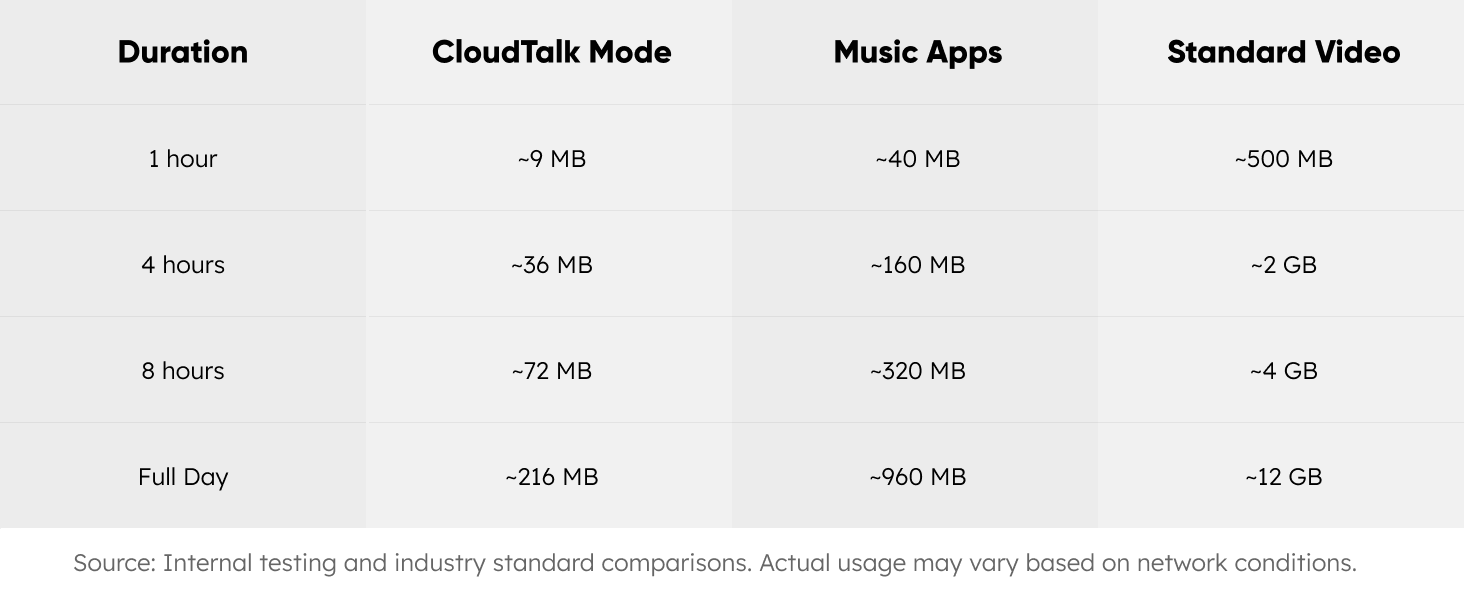
DATA USAGE

Data is only used when network communication is active.

Usage is similar to standard voice calls.

Powered by Advanced Technology

  • ASMAX CloudTalk cloud networking icon glowing in blue on a dark tech background

    Cloud Infrastructure


    Dedicated servers ensure stable, low-latency connections

    · Global network support extends communication beyond Mesh limits

    · Built for real-time group communication

  • Black motorcycle helmet surrounded by blue sound waves representing clear intercom audio

    ASMAX Hardware Optimization


    Optimized for helmet acoustics and high-speed riding

    · Adapts automatically as connection conditions change

    · Reduces wind noise for clearer communication

1 of 2
ASMAXWORLD app interface showing connected devices and management hub

Need to Connect Beyond ASMAX Devices?


CloudTalk Mode is a simpler, network-based way to communicate across brands.

Just connect through the app—no complex setup required.

Learn More
ASMAX smartphone app interface showing F1 intercom settings and battery status

Start Riding Connected

Download the ASMAX WORLD App and get connected in just a few taps.

Learn More

Choose Your Gear

Find the right intercom for your ride and start experiencing seamless communication.

Support & FAQ

Why does ASMAX MODE show “Operation failed” or “Please update device”?

This usually happens when the app or firmware is not up to date.

  • Make sure your ASMAX WORLD App is updated to the latest version
  • Update your headset firmware, as older versions may not support ASMAX MODE

I can’t find the room ID, or I’m in the same room but cannot talk.

This is usually caused by server region mismatch.

  • Ensure all riders select the same server region in “My Settings”
  • Users must be on the same region to join and communicate

Why does the intercom stop working during use?

This is usually related to phone background restrictions.

  • Check if the ASMAX WORLD App has required permissions enabled
  • Make sure the app is not being closed by system battery optimization or background management

Can ASMAX MODE be used with other brands?

No. ASMAX MODE only works between ASMAX devices.

To connect with other brands, please use CloudTalk Mode, which operates via mobile network.

Does the ASMAX WORLD App need to stay running in the background?

Yes. The app must remain active in the background with network access.

  • If the app is fully closed, the group connection will end
  • Screen off does not affect operation
  • However, if the system force-closes the app in power-saving mode, the connection will be interrupted

Does ASMAX MODE use mobile data?

Data is only used when network communication is active.

Usage is similar to standard voice communication apps.